Overview
What needs you right now — paused runs, work that has not moved, and the reason each one is stuck.
Developers New to Kontour? Start with Flow Agents.
see what is live, stale, blocked, waiting, and backed by proof
Five agent sessions are running. One of them is stuck. Console is the screen that tells you which one, what it is waiting for, and what proof is sitting behind the gates that already passed — read out of the files your runs are writing anyway.
$ npx --package @kontourai/console kontour serve
Kontour local hub: http://127.0.0.1:3737
Console UI: http://127.0.0.1:3737/
POST /records GET /state GET /inspect GET /events GET /stream SSE
What it answers
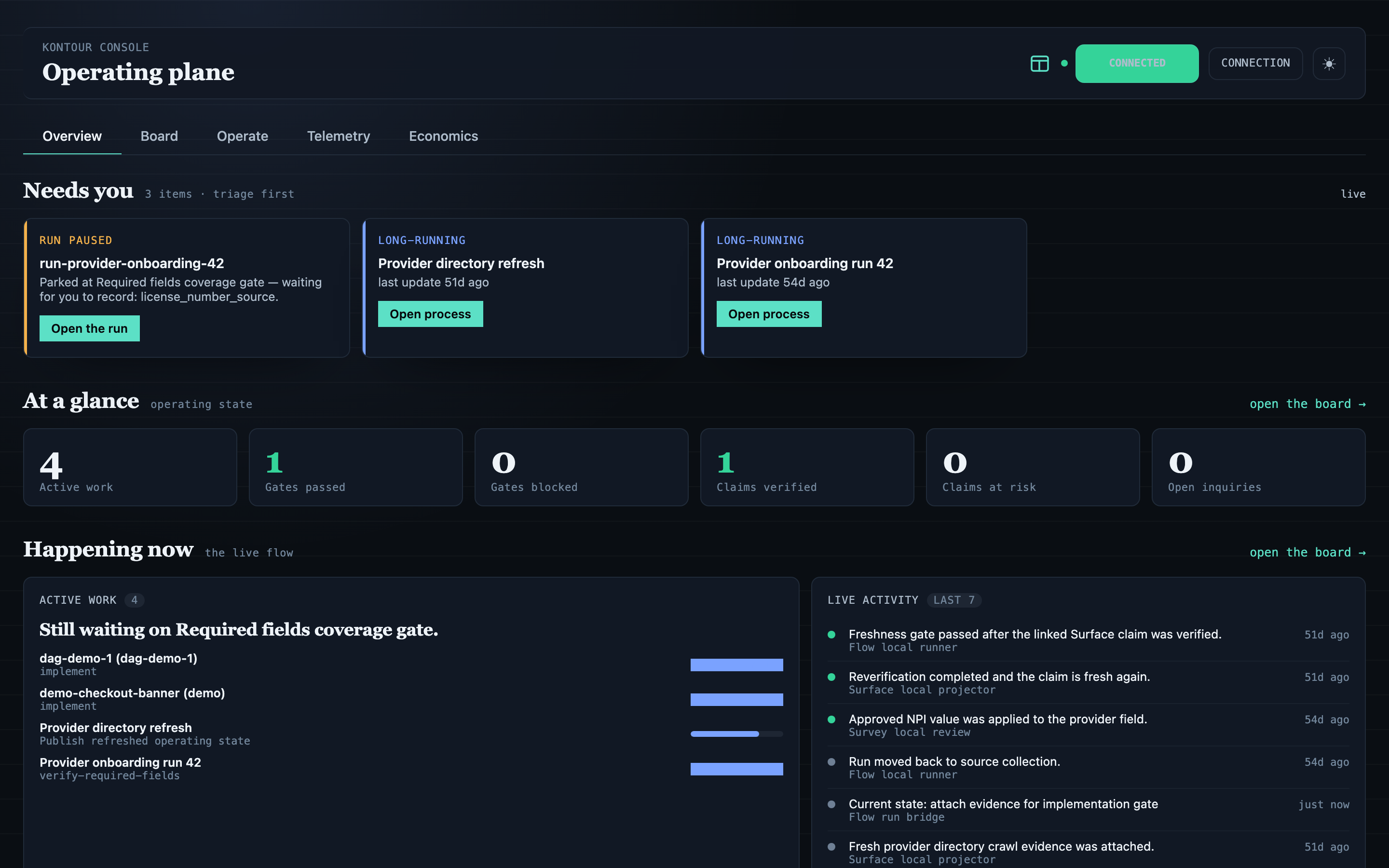
The operating plane
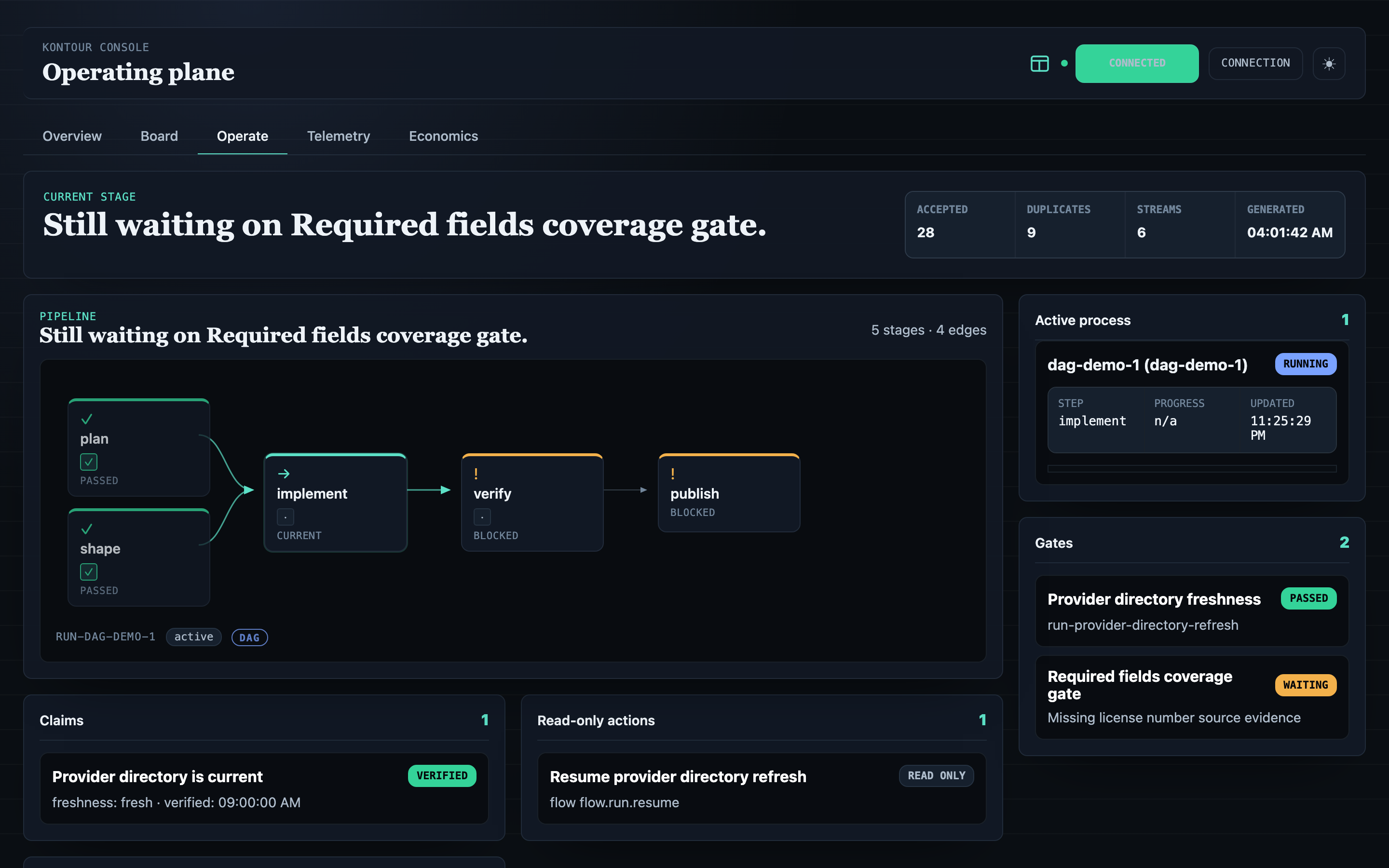
Five views
What needs you right now — paused runs, work that has not moved, and the reason each one is stuck.
Every work item by stage. Open a card for the gates and the evidence sitting behind it.
One run: its pipeline, the stage it is on, and the gate holding everything downstream.
What the agents actually did, per tool — latency, failures, and cost, rolled up by project and work item.
The ROI surface: does the scaffolding pay for itself?
Example use case
The afternoon before a launch, one screen: a Surface claim that has gone stale under a run still depending on it, a Flow gate blocked on browser evidence nobody attached, and a Veritas readiness report that came back clean. Three products, three record types, one list, sorted by what is actually in the way.
Every line keeps the event that produced it and a link into the product that can resolve it, so the next move is a click rather than a reconstruction.
Run it locally
No global installation or hosted account is required. The firstnpx run may download and cache the npm package. The Console server runs locally; configured producers and integrations have their own network behavior.kontour serve starts the hub and the bundled UI on127.0.0.1:3737 — loopback only, token-gated if you ever expose it further, with the record history under.kontourai/consolein your own repo. Node 22+. If you would rather have the commands on your PATH,npm install -g @kontourai/consoleinstalls the same ones.
Then point it at work you are already doing.kontour-flow-bridgefollows Flow runs under .kontourai/flow, and kontour-process-bridgefollows Flow Agents sessions, including the ones sitting blocked or waiting on a person. Both read those files without writing to them — the run below is this site's own repo.
About that kontour word: there is also a separate suite router, @kontourai/cli, which owns the same command name across Flow, Flow Agents, and Console — it looks at which Kontour packages you already have and passes your command to the matching one, without ever fetching anything. Because both packages provide akontour binary, install one of them globally rather than both; thenpx --package form above picks explicitly and sidesteps the question.
# follow the Flow runs already in this repo
$ npx --package @kontourai/console kontour-flow-bridge --flow-root .kontourai/flow --watch
kontourai-kontourai-io-208: 7 events (7 accepted, 0 duplicate, 0 failed)
kontourai-kontourai-io-212: 12 events (12 accepted, 0 duplicate, 0 failed)
watching .kontourai/flow every 2000ms; Ctrl+C to stop
# same records, read back without the UI
$ npx --package @kontourai/console console-inspect local .kontourai/console
Console local inspection
Event streams: 1
- local:events/flow-bridge/project-flow-local.jsonl: events=19 accepted=19
types: flow.pipeline.snapshot=2, process.progressed=15, process.started=2
Projection snapshots: 0
Validation: errors=0 warnings=0
Where the answers come from
Flow and Flow Agents feed the screen live through their bridges today. Surface, Survey, and Veritas records are written by local producer helpers you call yourself — the record shapes are settled, the live feeds are landing product by product. Whichever way a record arrives, it keeps the identity of the product that made it, so a status can always be traced back to the event underneath it.
Flow live runs, gates, transitions, exceptions
Flow Agents live session state, blocked reasons, review waits
Surface helper claim status, evidence, freshness
Survey helper fact-review records, candidates, decisions
Veritas helper repo readiness, evidence gaps
live = a bridge follows the product's files as they change
helper = a local producer you call writes the records
───────────────────────────────
Kontour Console one screen over all of them
Provenance
Every gated delivery ships a trust bundle — the claims that were made and how each one was verified — alongside a checkpoint file stamped with the commit it was sealed against, both committed with the change at the exact head that merges. The Flow bridge brings the evidence relevant to each run into Console's trust panel, where you can ask what was verified, how, and by whom.
Producing and signing that bundle is Flow Agents' job. Console's job is putting it next to the run, so clicking a gate that says "passed" shows you the proof rather than the word.
Built for daily operations
Console turns scattered process events into something you can work from: what changed, what is stuck, why it matters, and where to go next.
Open integration surface
Event streams, identity links, queue actions, and live state are available through the same contracts that power the bundled interface. Build a focused operator view, automate a response, or embed the live state in the tools your team already watches. The hub publishes a generated OpenAPI document at/openapi.json for every endpoint the UI calls, and answers MCP on the same port, so an agent can ask what it has been costing you.
The npm package ships everything the screenshots above are running: the loopback hub, the bundled UI streaming live state over SSE, the Flow and Flow Agents bridges, the local inspector, and dependency-free helpers that write records under.kontourai/console. That open-source package is the foundation; a private production deployment of it runs hosted at console.kontourai.io, with OIDC login, per-session revocation, and a durable Postgres-backed store.
// write records locally — no network
import { KontourEmitter, LocalFileSink } from "@kontourai/console";

const emitter = new KontourEmitter({
  sink: new LocalFileSink({ root: ".kontourai/console" }),
});

const result = await emitter.emitEvent({
  schema: "kontour.console.event",
  version: "0.1",
  id: "event-provider-directory-updated",
  type: "claim.updated",
  occurredAt: "2026-06-01T16:00:00Z",
  producer: { product: "surface", id: "surface-console-producer" },
  scope: { product: "surface", kind: "tenant", id: "acme" },
  subject: { product: "surface", kind: "claim", id: "claim-provider-directory-current" },
  payload: {}
});

// result.outcome === "accepted"
// → .kontourai/console/events/surface-console-producer/tenant-acme.jsonl
Every other Kontour product works fine on its own. Console is for the day you are running enough of them at once that you have stopped being able to hold it all in your head.