v0.3.0@kontourai/fieldwork

Standalone application

Fieldwork

every value carries the line it came from

Somebody has to read the contract, the filing, the report and pull the numbers out of it — and somebody downstream has to trust those numbers. Fieldwork does the reading, puts each value next to the exact line of the document it was found on, and makes you approve it. It will not hand you a file until you have. When the source changes underneath you, it reopens the decisions that just went stale.

credential-free quickstart
# Node 22 · offline demo, no signup
npm install @kontourai/fieldwork

# 1. pull the values out of the sample renewal brief
npm exec -- fieldwork run \
  --task node_modules/@kontourai/fieldwork/examples/vendor-obligations/task.json \
  --source node_modules/@kontourai/fieldwork/examples/vendor-obligations/source.txt \
  --json
# → {"ok":true,…,"runDirectory":"…/.fieldwork/runs/run-cdecb02ac92d8fa1","proposalCount":7}

# 2. review it in your browser; Ctrl-C stops the server
npm exec -- fieldwork open .fieldwork/runs/run-cdecb02ac92d8fa1 --json
# → {"ok":true,"url":"http://127.0.0.1:64215/#cap=…","loopbackOnly":true}

# 3. hand off only what you resolved
npm exec -- fieldwork export .fieldwork/runs/run-cdecb02ac92d8fa1 --output reviewed.json --json

Output above is from a real run of the published package, trimmed at the marks. The link that step 2 prints only works on your own machine, and only while the command is running — don’t paste it into a chat. The demo needs no account and no key; real documents need a model.

Who this is for

If part of your job is reading documents so that other people can act on what’s inside them — obligations and renewal dates out of contracts, deadlines and criteria out of funding notices, findings out of reports, facts out of public filings — and being wrong about one of those values is expensive, this is built for you. Reviewing takes a browser and a pair of eyes. Starting a run takes a terminal, so if that isn’t you, you’ll want someone who’s comfortable there for the first ten minutes.

A renewal you have to get right

Here’s the document. Here’s what you get. Here’s what you can’t do until you’ve looked.

Everything below is the vendor-obligations example that ships inside the package, run on a laptop with no account and no key.

01 — What you start with

A document nobody has checked

Northstar Analytics — 2027 renewal brief
…
Vendor: Northstar Analytics
Annual renewal fee USD: 48000
Renewal date: 2027-04-01
Renewal posture: automatic
Notice period days: 45
Security assurance: SOC 2 Type II report requested, 2026 report not yet received
Hosting region: United States

Open questions for the reviewer:
The signature page of the executed agreement records a renewal date of
2027-05-15, which does not match the commercial schedule reproduced above.
…

Somebody has to get that renewal date into the system that will chase it — and this brief carries two dates. Today somebody retypes one of them, and nobody can tell afterwards which line they read. Lines are verbatim from thevendor-obligations source that ships in the package; each stands for lines left out for length.

02 — What Fieldwork proposes

Seven values, each with its receipt

  1. commercial.annualFeeUsd

    48000

    found in “Annual renewal fee USD: 48000”chars:332-361

  2. renewal.date

    2027-04-01

    found in “Renewal date: 2027-04-01”chars:362-386

  3. security.assurance

    SOC 2 Type II report requested, 2026 report not yet received

    found in “Security assurance: SOC 2 Type II report requested, 2026 report not yet received”chars:437-517

Three of the seven, above. None of this is data yet: every row lands in a review queue with the source open beside it, andchars:362-386 is the exact stretch of the document the value was read out of — so checking a value means reading one line, not trusting a score. Five of the seven confirm on sight. The renewal date is contradicted further down the same document, and the security assurance names a report nobody has received.

03 — What you can’t do until you’ve looked

The export refuses

export with one row still open
npm exec -- fieldwork export .fieldwork/runs/run-cdecb02ac92d8fa1 --output reviewed.json --json
{"ok":false,"error":{"code":"FIELDWORK_ERROR","message":"Export refused: unresolved-review-item"}}

One refusal per row nobody has settled — seven of them on a fresh run, and still one here after five accepts and acould not confirm, because the contested date is open.reviewed.json is never written. Resolve the last row and the file exists: each value carries the line it came from (sourceLocator, excerptOrSummary), who settled it, and when — and the assurance nobody could confirm stays"status":"proposed" rather than passing itself off as verified.
And a month later, when the vendor reissues the agreement:fieldwork recheck compares the new document against the run you already approved. Identical bytes cost nothing and change nothing. A moved, changed, or vanished value opens a new review round covering exactly the rows it affects. The run you already signed off stays intact and dated — you simply get told which of your decisions no longer describes the document.

The review screen

The document and the decision, on one screen.

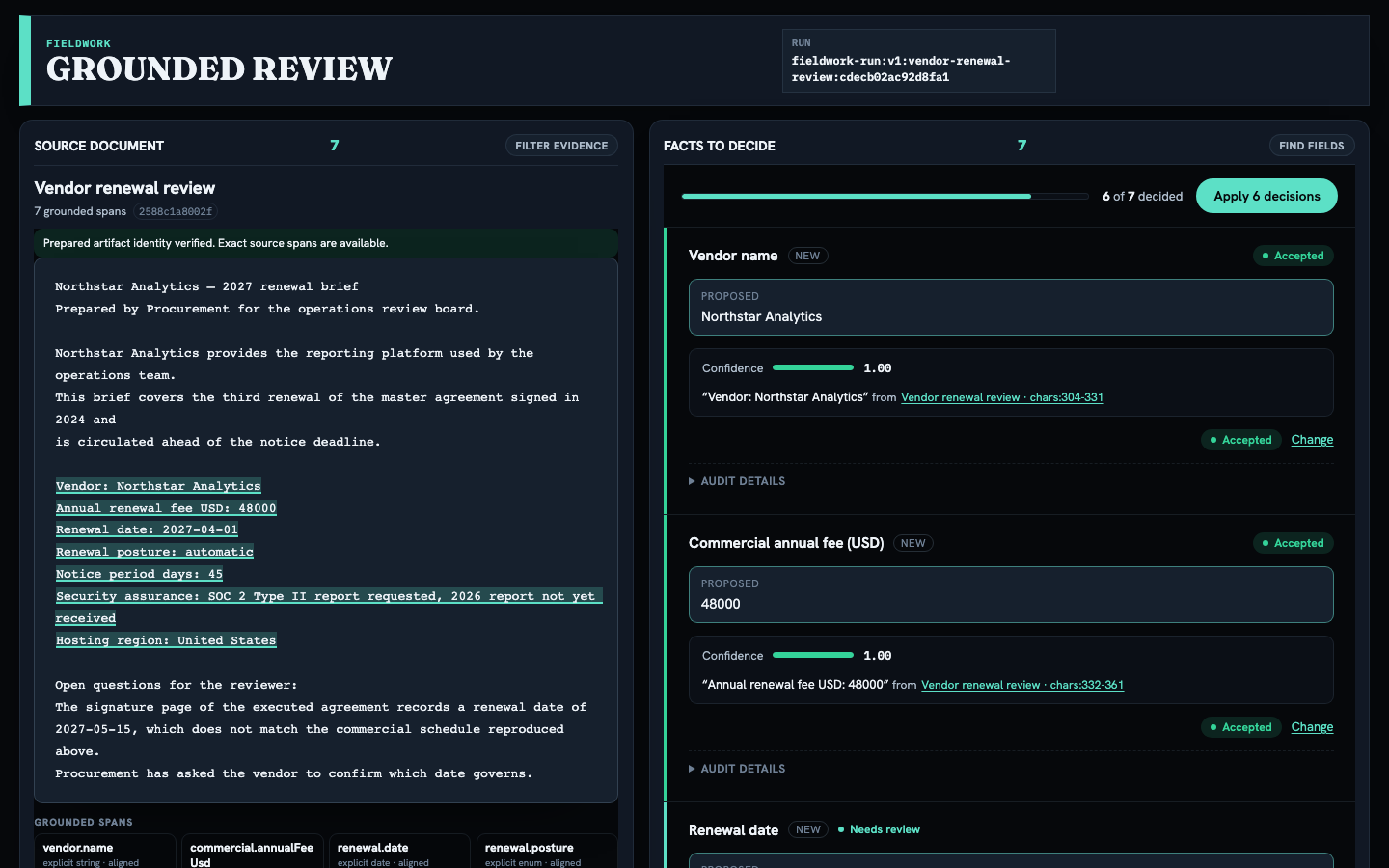
The Fieldwork review screen: the renewal brief on the left with all seven extracted values highlighted where they were found, and beside it a review queue reading “6 of 7 decided” in which the vendor name and annual fee are accepted and the contested renewal date is still awaiting a decision.
The brief on the left with every proposed value highlighted on the line it came from; the queue beside it, mid-review. Five values confirmed on sight, the security assurance marked could not confirm, andrenewal.date still open — because the document proposes 2027-04-01 and, further down the same page, mentions 2027-05-15. A local run of the published package, captured against v0.3.0 on 2026-07-26; this is one 1440×900 frame, with the remaining rows below the fold. The browser test that renders this screen →

The queue in that screenshot is Survey, the review workbench Kontour ships on its own. Fieldwork is the finished app; Survey is the review queue inside it. Fieldwork mounts it rather than building a second one, so a decision recorded here means the same thing anywhere else in Kontour it shows up. The queue lays out on a phone too — the release’s browser test renders the same screen at 390px, which is why there is no second screenshot of it here.

Documents and scans

Review PDF and OCR results with their layout context intact.

Connect the parser or OCR reader you already trust, and the evidence keeps its address: page 2, this layout block, this table cell. You can find the value in the original document without hunting for it. Which reader prepared the source stays attached to the run, so a reviewer can see how the text was produced.

Fieldwork brings the review and the evidence view; PDF parsing and OCR come from readers you plug in. If one is missing, the CLI stops and tells you which reader it needs rather than guessing at the text.

Inspect the format browser test →
a PDF with no reader attached
npm exec -- fieldwork run --task task.json --source brief.pdf --json
{"ok":false,"error":{"code":"PDF_ADAPTER_REQUIRED",
  "message":"PDF extraction requires a host-supplied PDF text adapter"}}

A typed refusal naming the missing reader, not a guess at the text. Attach one and the same run carries page, layout block, and table-cell addresses into the inspector beside every value — the format browser test above renders that screen.

Adopt it your way

Start with the app. Take it further when you need to.

Run the app as it ships

  • Start a run from a task file and a source document
  • Read every proposed value beside the line it came from
  • Record decisions and export only what was resolved

Put the review inside your own product

  • Mount the same source inspector and review queue
  • Keep your own labels, rules, and storage
  • Replay decisions against the exact snapshot they were made on

Feed it more kinds of document

  • Bring a page it fetched for you, a saved file, a PDF, or a scan
  • Carry page, layout, and table-cell context into the evidence view
  • Run offline, against a coding agent you're already signed in to, or against your own API key

The public contract for embedding it →

Check it yourself

What’s proven, and what isn’t.

What the CLI promises

The released contract documents run, open, recheck, inspect, and export behavior, including the refusal you get when a row is unreviewed, stale, or tampered with.

Read the v0.3.0 contract →

Where the screenshot comes from

The review screen on this page is a local run of the published package, captured through this site’s guarded capture path and bound to its bytes. The same screen is rendered by the public browser test, at desktop and phone widths. Nothing here is a mock-up.

Inspect the browser test →

What the fixtures establish

Checked-in fixtures and oracles establish the mechanics: character locators, replay, review state, refusal, export. They establish nothing about how well a live model reads your documents.

Inspect the fixtures →

What a model call leaves behind

When you point a run at a live model, each call records what ran, what it used, what it cost, and what failed — without your document text, your credentials, or raw diagnostics.

Read the runtime note →

Browse the released source →

What it costs to try

The demo is free. Real documents need a model, and it’s yours.

The extractor in the box finds values by exact label — which is why the sample file above looks like Renewal date: 2027-04-01. It runs offline with no account, and it exists so you can see the review, the refusal, and the export before deciding anything. Point that same task at an actual renewal letter and the run comes back with "proposalCount":0 — a real letter doesn’t label its own fields. It is also why every row in the screenshot reads confidence 1.00: an exact label match is certain, and it says nothing about whether the right label was read. Graded confidence comes from a model runtime, not from the offline fixture.

Real documents need a model, and Fieldwork doesn’t ship one or resell one. You point a run at a coding agent you’re already signed in to (--runtime claude-code:sonnet, --runtime codex:gpt-5), or at your own API key — which requires a spend ceiling and a rate assumption you set (--max-cost-usd, --estimated-usd-per-1k-tokens) before the first call. Which runtime you chose is part of the run’s identity, and every call records what it used and what it cost. The review, the refusal, and the export behave identically either way.